Istanbul Technical University
Mechanical Engineering Faculty
MAK112E
– Computer Aided Technical Drawing
Spring Semester 2009 (1+3) 2.5 credits
Lecturer Dr. Serpil KURT,
Assoc. Prof.,
Tel:
293 1300 – 2690, e-mail:
kurtserp@itu.edu.tr
Assistants Özlem SALMAN, Eren
KAYAOĞLU, Research Ass.,
Tel:
293 1300 – 2449, e-mail:
ozlemsalman@itu.edu.tr, kayaoglu@itu.edu.tr
(www.mkn.itu.edu.tr/~kayaoglu)
Office
Hours Tue
09-16; Wed 09-18; Thu 14-16; Fri 9-13
Course
Hours Thursday
830-1230(406); Fridays 1330 -1730
(406);
Prerequest RES 105
The text book [1]Giesecke, F.E., et al, Engineering Graphics, MacMillan Pub,
www.mkn.itu.edu.tr/~mkimrak/MAK112E.htm
Recommended
[2]Goetsch, D., Chalk,
W., Nelson, J.A., Technical Drawing, Delmar Pub, 2000. T.353.G64.2000
Texts [3]Shih, R.H., Zecher,
J., AutoCAD 2000 MultiMedia
Tutorial, SDC Publ., 1999. T.385.S55.1999
[4]Madsen,
D, et.al Fundamentals of Drafting Technology, Delmar Pub, 1994. T.353.M33.1994
[5]Jensen,
C.H. Engineering Drawing and Design, McGraw-Hill,
2002, 2008. T.353.J46.2002, T.353.J46.2008
[6]Horenstein, M.N., Design Concepts for Engineers, Prentice
Hall, 2002. TA.174.H67.2002
(for
design project) [7]Earle, J., Engineering Design Graphics: AutoCAD
2000, Prentice-Hall Publ, 2001. TA.174.E37.2001
[8]Earle, J., Engineering Design Graphics: AutoCAD
2007, Prentice-Hall Publ, 2008. TA.174.E27.2008
Course
description Introduction to
computer aided technical drawing. Geometric construction.
Orthographic projection and multi-view drawings. Hidden details and Scales. Pictorial drawings. Sections and sectional views. Half section, local section, revolved section
and removed section. Auxiliary views and
intersections. Dimensioning fundamentals and surface texture indication. Tolerances, limits and
fits. Screw threads and engineering fasteners.
Assembly modeling and assembling drawing. Three dimensional design and solid modeling.
Objectives This course of study aims to teach students: learning the standard techniques of preparing engineering drawings, reading and interpreting drawings, and solving three-dimensional technical problems that require the application of descriptive geometry and graphical analysis, computer aided drafting and modeling, how to print and present standard 2D blueprint and solid models.
Content of
Graphical
interpretation of orthographic projection to include auxiliary views, section views,
The Course
dimensioning, translation
of design instructions into detail and assembly drawings, drawing conventions including
referencing and surface finish notation, election of tolerances based on design
requirements.
Learning
Outcomes In successfully completing this course students will a) draw
2D drawings in standard 2D blueprint forms b) apply dimensioning in 2D drawings,
c) design and align given parts in an assembly, d) print out and present 2D
drawing, e) create solid model of a part.
General
Skills The course is designed to give
undergraduate engineering student ability to read and write the language of
Engineering Graphics. It provides the undergraduate engineering student with a
background in descriptive geometry, orthographic projection, basic
dimensioning, auxiliary and section views, and computer-aided engineering
graphics. Students are to learn to use a commercial CAD package.
Learning
Experiences Students will
construct orthographic views of various components, exercises selected from the
textbook. Students will practice construction of orthographic drawings
from given pictorial views using traditional drafting instruments. Students
will construct assembly views and add a simple part list. Students will
select appropriate fits for these assemblies and add tolerances to their detail
drawings. Suitable surface textures will be selected and the symbol added to
the detail drawings. Students will gain knowledge and experience of an up
to date version of AutoCAD, Pro/E and SolidWorks.
Learning Methods A variety of teaching and
learning methods are used including formal lectures, cooperative learning,
individual project, laboratory practice, and homework, question and answer
sessions. Lectures and practice
will be in 406 Comp. Lab. Students use many online sources, referring to online
public domain references and reference books that are found at local public
libraries. Field trips are suggested and are accomplished within students'
local areas. Students will respect each other’s personal beliefs and be
committed to helping each other learn about the course objectives and
themselves. Students also are expected to help other students in improving
their CAD/drafting abilities through one-on-one and group activities. If you miss a class for any reason, you are responsible for obtaining
any material and announcement from other students. Instructor’s notes will not
be given out. Also, students are required to read the appropriate chapter
before attending the class.
Academic
Dishonesty Cheating and plagiarism
are serious academic matters and they will be handled by the following policy
and by the University policy. A grade of zero is assigned for the entire
assignment or exam. The case will be reported to the Dean of Students for
disciplinary action.
Assessment This course is very time
consuming. This is a three credit hour
course, so expect to work at least three hours outside of class for every one
hour in class. The student should spend
at least six hours per week on the computer outside of class. To successfully progress through the course,
students must understand each of the topics in the order it is presented.
Students missing class are still responsible for the material covered in class.
Students are expected to comply with all requirements for the class. Drawing
assignments and projects will be graded based on content and neatness. Grades are not given, they are earned. You
are expected to accept all responsibility for your performance in the class.
Midterm Exams………….. . . .
. . . . . . . . . . . . . . . . . . . . . . . 20
%
Homework’s………… . . . . . . . . . . . . . . . . . .
. . . . . . . . . . . . 10
%
Design Project (Week 14) . . . . . . . . . . . . .
. . . . . . . . . . . . . . 10
%
Assignments <Average of the assignments>
. . . . . . . . . . . 20 %
Final Exam (Exam
Week) . . . . . . . . . . . . . . . . .
. . . . . . . . . . 40 %
Exams (20%) There will be two midterm exams and one comprehensive final exam. No
make-up exam will be given (a grade of zero will be assigned) except for a
verified and written excuse. The instructor should be informed in advance or no
later than 48 hours after the exam in case of an emergency. It is the
instructor’s discretion to give the make-up exam.
Homework (10%) Submit your homework both in hard copy form (print
out) and upload to Ninova e-Learning
System. Late homework is not evaluated. Homework should be
submitted in due time with complete form.
You must use engineering paper for all handwritten problems and
projects.
http://www.mkn.itu.edu.tr/~mkimrak/MAK112E_homework.htm
Design Project (10%) Design Project is designed
as a comprehensive problem, (the instruction from “Engineering Design Graphics”
[7] by Earle page 102. It is selected from the p.111, problem
78. ref.7) During the 2nd course week : The
design team will be formed by 4 or 5 members; One of the team members will be
selected as a team leader; The team activity schedule will be prepared ; The
course instructor will be informed about your team, the leader, and the team
activity schedule ; Otherwise, the design teams will be organized by the course
instructor; Progress report will be submitted and presented during the 6th
course week.
Assignments (20%) It is compulsory to ATTEND
at least 80% of the practice. Draw all
assignments using a CAD package as a tool in Comp. lab. You are to stay
in lab and work on your PC until they are completed and handed in or the class
ends. It is up to each student to complete the work. No credit will be given
for late work. Assignments will be collected within the last five minutes
of class. Repeating the assignments is not possible. All computer assignments must be turned in on
disk and hard copy. The student should
print their name clearly on the disk.
The hard copy must contain an appropriate title block as discussed in
class.
Course Plan
Week
1 – Introduction to computer aided drawing
Week
2 – Parametric design & basic drawing functions
Week
3 – Orthographic projection and multi-view drawings
Week
4 – Principles of dimensioning
Week
5 – Creating sectional views
Week
6 – MIDTERM EXAM #1
Week 7 – Three
dimensional design and creating parts in 3D drafting
Week
8 – Applying
constraints and dimensioning in solid modeling
Week 9 – Extruding,
modifying and redefining, feature construction
Week
10 –Transferring 3D parts to drafting detailing
Week 11 – MIDTERM EXAM #2
Week 12 – Assembly
modeling and assembling drawing
Week 13 – Surface
modeling
Week 14 – Design Project
Presentations
Evaluation
and Final grade will be awarded as
following. However, the instructor may adjust the scale according
overall grading scale to the class
performance. The following grading scale is the suggested grading scale.
|
Marking System |
|||
|
AA |
93 – 100 |
CC |
51 – 60 |
|
BA |
92 - 85 |
DC |
45 – 50 |
|
BB |
71 – 84 |
DD |
40 – 44 |
|
CB |
61 – 70 |
FF |
< 40 |
Coordinator
Dr. C. Erdem İMRAK, Prof.
Date January 2009
![Metin Kutusu: MAK 112E Computer-aided Technical Drawing
2008/09 Spring Semester
Homework # 1 /mutli- view
A pictorial drawing of a cast iron component (Gripper Rode Center) is given in (page 192 Fig.6.104) [7]. Using layout A3 (adjusted) draw in 1st angle projection, the following views:
a) a front elevation (view)
b) a plan (top) view
c) an end elevation (right side view)
d) give all necessary dimensions.
Homework # 2 /sectional view
Two views of a cast iron component (Bracket) are given in (page 440 Fig.14.57) [1]. Using layout A2 (adjusted) draw half-size in 1st angle projection, the following views:
a) a front elevation (view)
b) a plan (top) view
c) an end elevation (right side view)
d) remove sections A-A and B-B
e) give all necessary dimensions.
Homework # 3 /solid model
The views of a cast iron component (Support Base for Planer) are given in (page 439, Fig.14.54) [1]. Using layout A2 (adjusted) create a solid model of the component using SolidWorks then, create necessary views with orthographic projections (front view, top view, left side view in full section on A-A as indicated and removed section B-B) and give all necessary dimensions with surface finishing symbols (with the exception of the surface of the holes, all the surfaces are to have a maximum surface roughness value of 6.3 µm. the surface roughness of the holes is to lie between 0.4 and 1.0 µm). Make sure that all rounds, fillets and runouts are properly created.
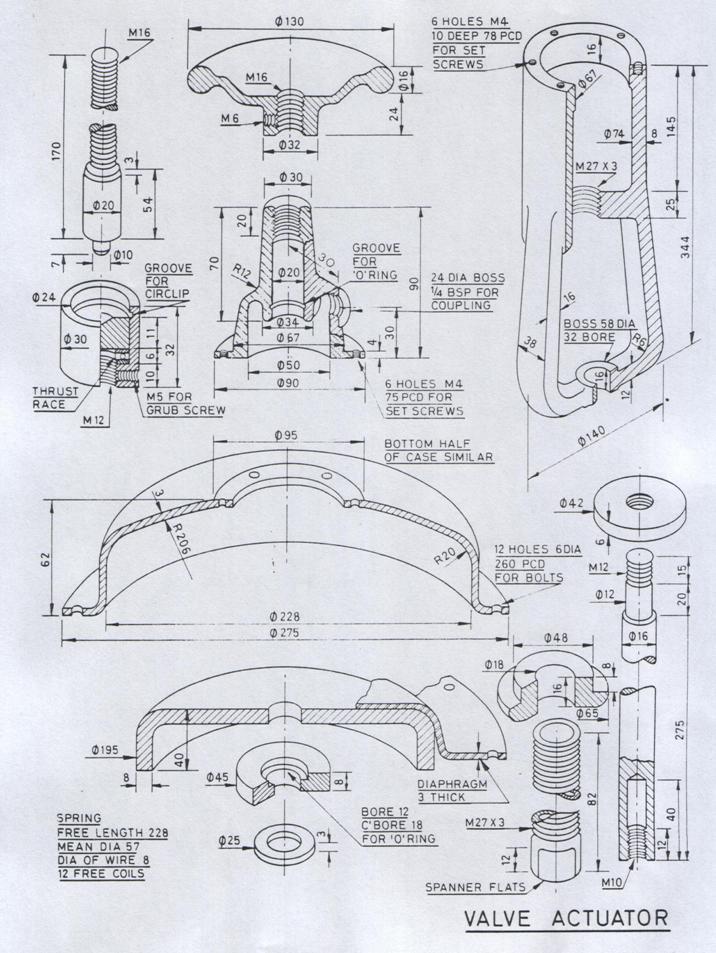
Homework # 4 /assembly
The details of a Valve Actuator assembly are given. Assemble all the components and draw full-size the following views
a) a sectional front elevation (view) of the assembly
b) a plan (top) view
c) an end elevation (left side view)
d) insert a title block and add a part list
use your judgment where dimensions have been omitted.
http://ninova.itu.edu.tr](mak112esyllabus_dosyalar/image001.gif)